Why Tacoter · 13 / 14
Keep your website. Add Tacoter ordering to it.
Put online ordering, a chat assistant, gift cards, a deals sign-up, your menu and your job openings on the website you already have.
Already on Tacoter? Open Add to Your Website
Six widgets
What you can add
Pick one or all six. Each one runs on your website and uses what you already set up in Tacoter.
- 01
Online ordering
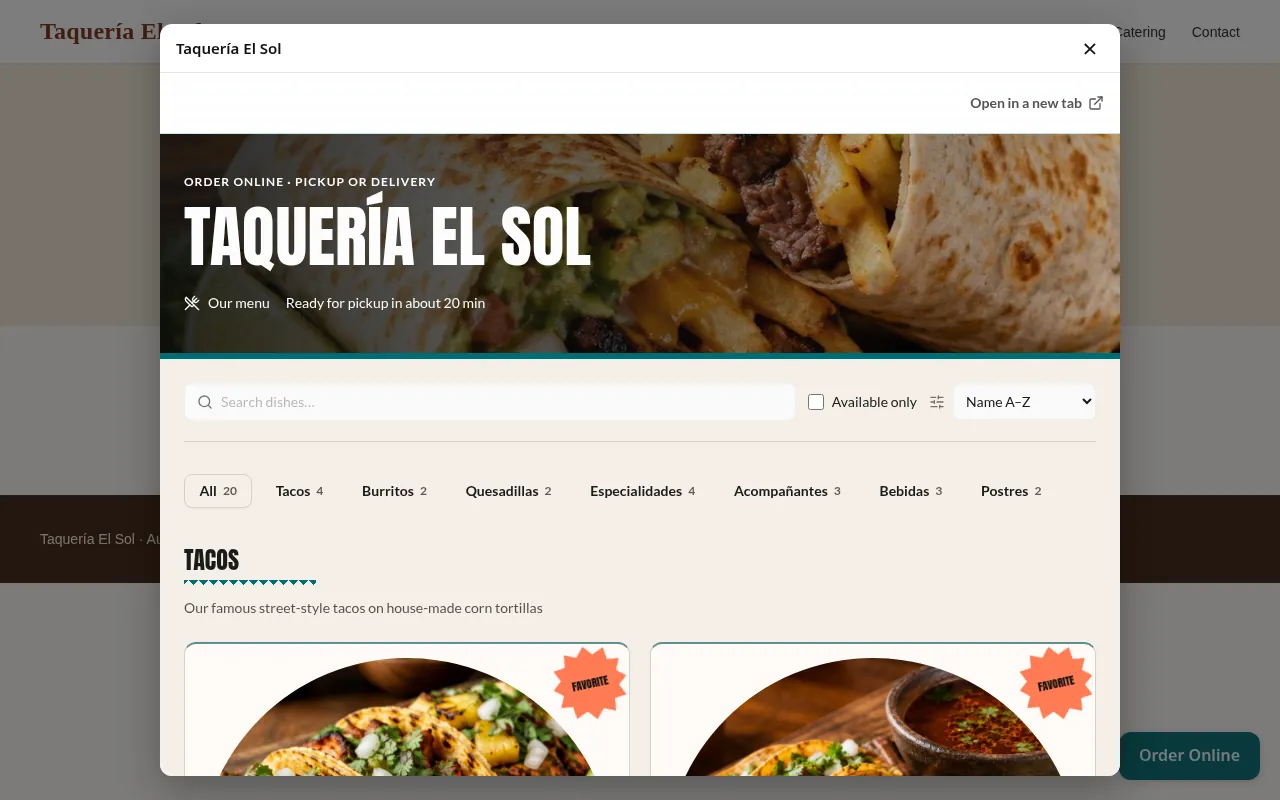
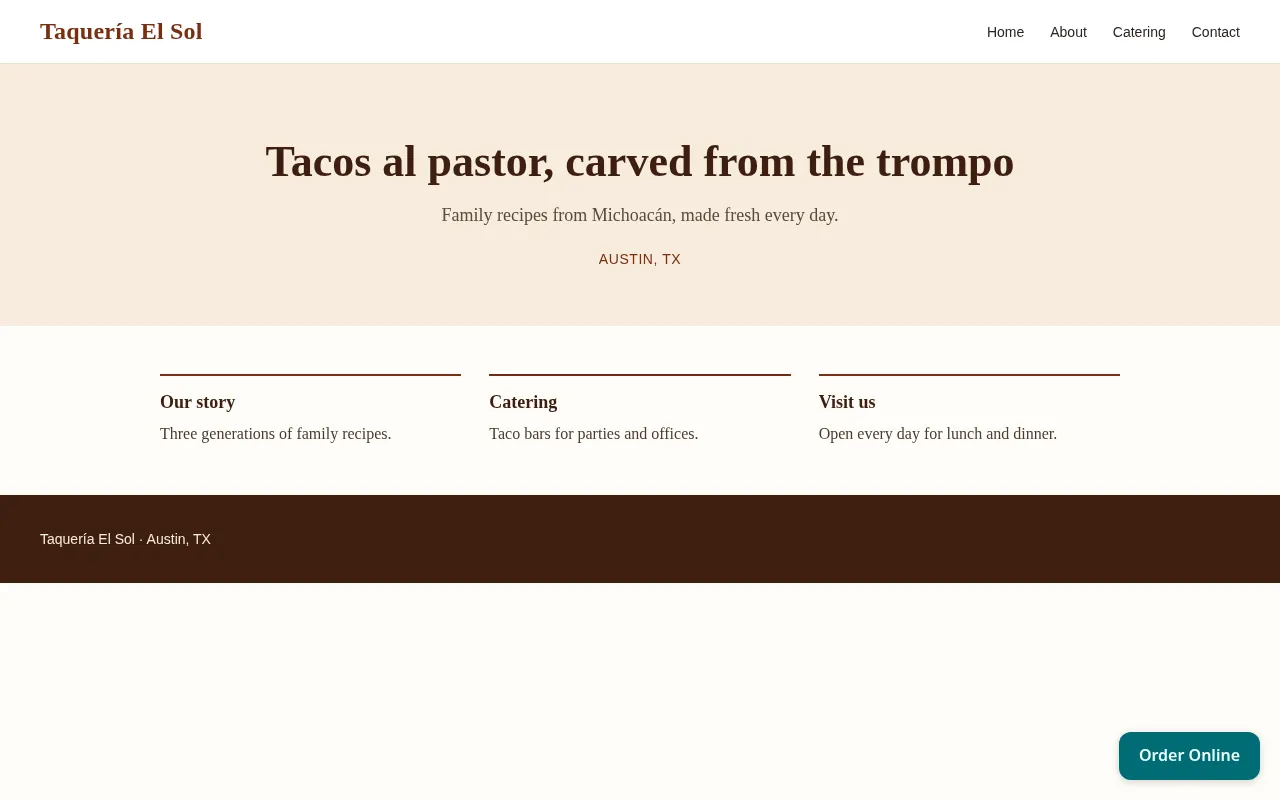
Your menu, cart and checkout, so customers can order without leaving your website.
- Floating button on every page
- Full ordering on one page
- Simple link
- 02
Chat assistant
Your Tacoter chat assistant in a chat bubble. It answers questions and takes orders, as it does on your Tacoter site.
- 03
Gift cards
A “Buy a gift card” button that opens the purchase in a pop-up, or the purchase right on your page.
- 04
Text and email sign-up
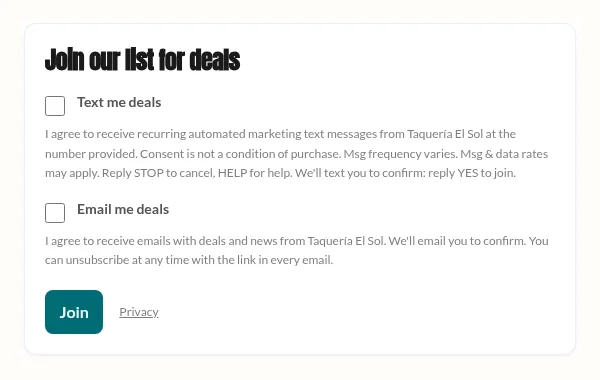
A “Join our list for deals” box that adds people to your text and email lists once they confirm.
Text sign-ups appear once Tacoter texting is active for your restaurant; until then the box offers email only.
- 05
Menu display
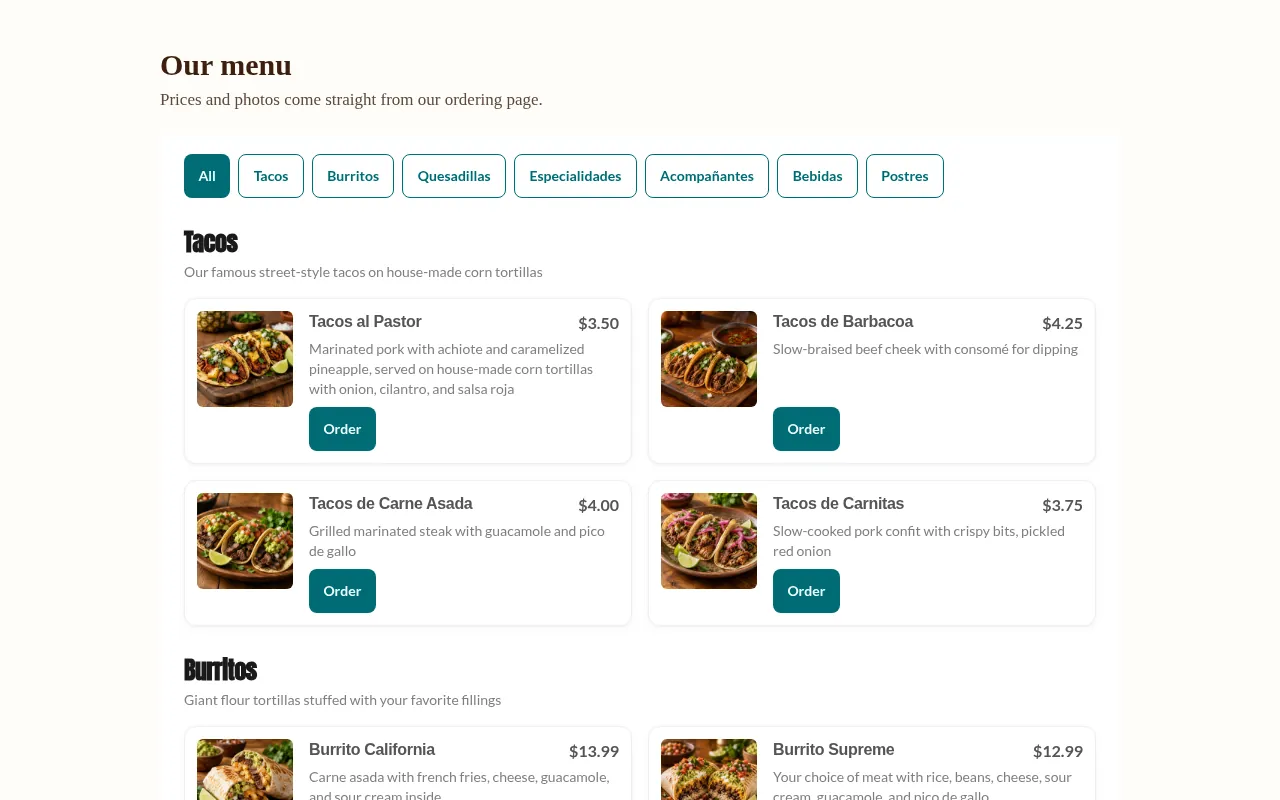
Your current menu with photos, descriptions, prices and category tabs. It changes when you edit your menu.
- 06
Hiring board
Your open jobs from Tacoter. “Apply” opens the job and its application on Tacoter.
On a real page
How they look on a website
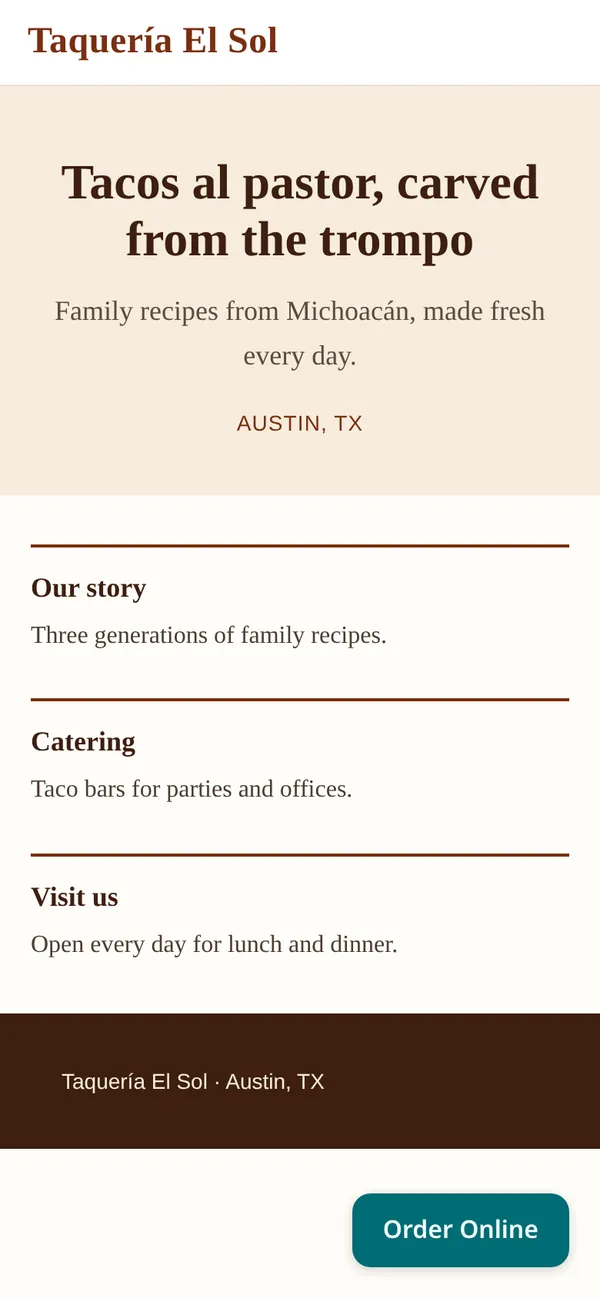
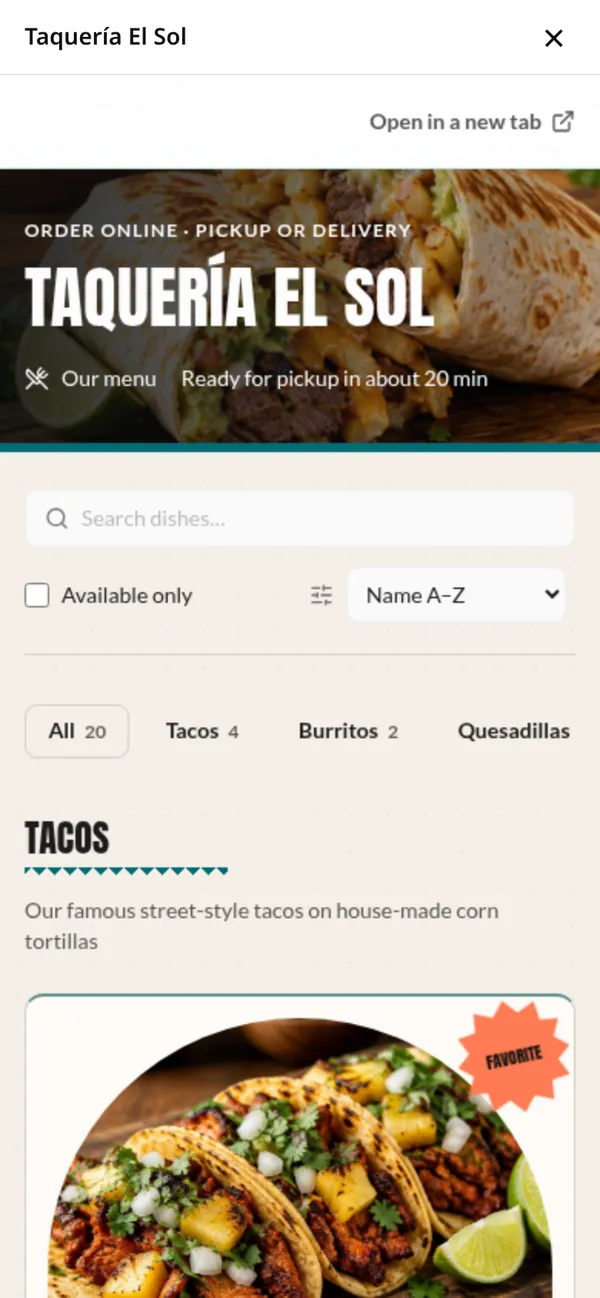
These are screenshots of the widgets running on a test website, with the Taquería El Sol demo menu.
Website builders
Works with your website builder
The dashboard has step-by-step install guides for each of these.
- Wix
- Floating buttons go in through Custom code, which needs a Premium plan with your own domain. On-page widgets use Wix’s Embed a site.
- Squarespace
- Code Injection for floating buttons (Core plan or higher), and a Code block for on-page widgets.
- WordPress
- A header and footer plugin, or the theme footer, plus a Custom HTML block. WordPress.com needs a Business plan.
- GoDaddy
- Website Builder keeps pasted code in a box, so use the plain link for ordering and the iframe version for on-page widgets.
- Shopify
- One line in your theme’s layout file, plus a Custom Liquid section for on-page widgets.
- Custom HTML
- Paste one line before </body> and put each widget’s code where it should appear.
If your builder doesn’t accept code, every widget also has a plain link or an iframe version.
How it works
Three steps
- 01
Add your website
In your dashboard, open Add to Your Website and enter your site’s address, like mytaqueria.com. Widgets only appear on websites you list.
- 02
Copy the code
Choose a widget and its options, see a live preview, and copy the code with one click.
- 03
Paste it into your site
Paste the code into your website, or send it to your web person by email with the steps for your builder.
Once a widget loads on your website, the dashboard shows where it was seen and when.
Good to know
Your brand, your orders, your customers
Your brand colors
Widgets use your Tacoter theme colors and fonts, including your own brand colors. You choose the button text, the button color, the corner and whether your site is light or dark.
Labeled in your dashboard
Orders placed through a widget show in Orders and Analytics as “Your marketing · Your website”.
Your customer list
People who order through a widget are added to your Tacoter customers, the same as orders on your Tacoter site.
English and Spanish
Widgets follow each visitor’s browser language, or you can set them to always use English or Spanish.
Questions
Website widget questions
Do I need to switch websites?
No. Your website stays on the same builder and the same address. You add a line of code, or a link, and the widgets appear where you put them.
Will it match my site?
Widgets use your Tacoter theme colors and fonts. You can change the button text, pick the button color from your theme, choose the corner for floating buttons and say whether your site has a light or dark background. If a color isn’t readable as a button, the widget uses one that is. Widgets don’t change your website’s own styles.
Does it work on phones?
Yes. On phones, the ordering and chat pop-ups open full screen. Widgets placed on a page fit its width and grow to fit their content.
What about payments?
Checkout runs inside the widget, and the widget is set up to allow browser payments such as Apple Pay and Google Pay where the browser supports them inside another website. Some payment methods and browsers don’t work inside another website. For those, checkout offers “Trouble paying here? Continue in a new tab”, which opens your Tacoter ordering page with the cart already filled in, and the order still counts as coming from your website.
Can my web designer install it?
Yes. In Add to Your Website, enter their email and we’ll send them the code and the steps for your website builder. They don’t need a Tacoter account. You still choose which websites the widgets may run on.
Can I still use a Tacoter site too?
Yes. Your Tacoter ordering page at tacoter.com/your-restaurant keeps working next to the widgets, with the same menu, prices and theme. Orders from both arrive on the same orders board, and the label shows which ones came from your website.
Which website builders does it work with?
Wix, Squarespace, WordPress, GoDaddy, Shopify and custom HTML, with steps for each in your dashboard. A few builders have limits: Wix custom code needs a Premium plan with your own domain, and GoDaddy Website Builder keeps pasted code inside its own box, so a plain ordering link works best there. Where code isn’t allowed, a plain link on any button works.
Which websites can show my widgets?
Only the websites you list under Allowed websites. The www. version is included. On any other website the widgets don’t appear.
How do sign-ups ask for permission?
Text sign-ups get a text asking them to reply YES and join only after replying. Email sign-ups confirm through a link in an email first. Customers can reply STOP or unsubscribe at any time, and the exact consent wording is saved with each sign-up.
Will search engines see my menu?
Search engines credit what’s inside a widget to tacoter.com. For your own website, you can turn on menu data for search engines or paste a static copy of your menu. The static copy doesn’t update itself, so copy it again after menu changes.
How do widget orders show in my reports?
On your Orders page they’re marked Your marketing · Your website, including orders placed through the chat widget, and in Analytics they count as your own traffic.
Step-by-step guides for every builder are in the help center. Read the website widget guides
Tacoter for restaurants
Add Tacoter to the website you already have.
Claim your restaurant’s page, add your menu, then copy the widget code from your dashboard.